Your dashboard
Your ARK dashboard is designed to support your learning by navigate to the units that you are enrolled in and resources and support materials that you may need during your studies.
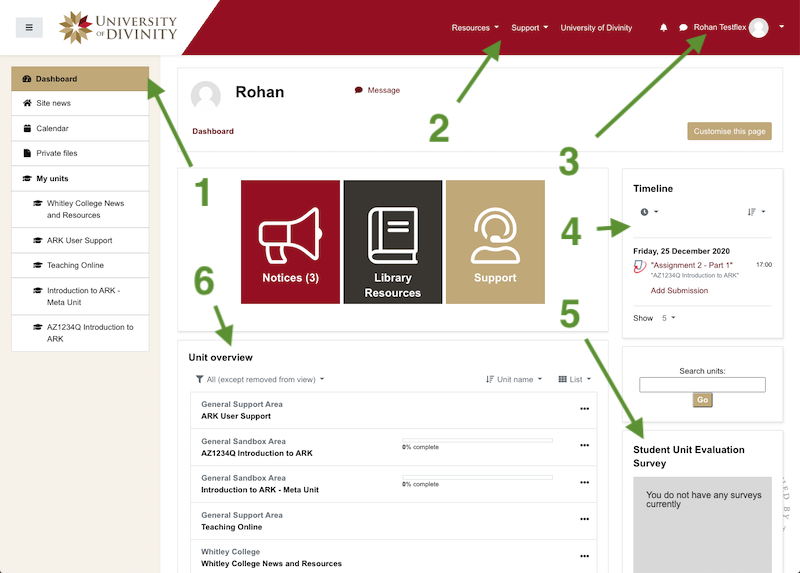
The key items are identified in the image above.
- Primary navigation is found on the left in a collapsible section. This changes based on where you are within ARK.
- Key support and resources are always available via the global navigation.
- Your profile and preferences can be located via the navigation in this section.
- The Timeline block presents information on upcoming activities.
- The Student Unit Evaluation block is populated when you have a pending survey
- The Course Overview section lists all of the units that you have access to
You will likely have access to more units than you are formally enrolled in for various reasons such as units that are upcoming or just completed can be visible and each College provides units for news and support purposes. Below are some frequent questions about the units listed.
I can’t find all my units in the Course Overview
A unit is only available to you as a student in ARK when the start date of the unit is reached AND you are enrolled in it.
Thus there are two likely possibilities if you can’t see your unit:
The start date has not been reached.
This will be the case for a semester long unit before the first day of semester, or for an intensive unit before the first day of the intensive.
You are not enrolled in the unit.
If the semester or teaching period has begun, then please check your enrolment status with your College Registrar.
I seem to have two units where I expect only one
For every unit you are enrolled in, there will be one unit created in ARK.
Where there are more than two levels (undergraduate and postgraduate, perhaps) or two modes of delivery (in class and online, perhaps) ARK will also have a “meta unit” created.
See the Types of Units document for an explanation of these units.
I have units listed from last semester
ARK will show units from the previous semester for a while so that you can access feedback on assessments.
In time, these will disappear.
If the old units are still visible at the census date of the next semester, please contact your College Registrar.